
Desk Management
A Desk Management Solution is your ally when transitioning to flexible seating
Desk Management for the Hybrid Office
Managing desks in a hybrid office means deciding how space is shared and used. Facility and workplace teams need clear rules for shared and assigned desks, useful information for employees planning an office day, and evidence to guide capacity decisions.
Flowscape desk management software brings these parts together. Set up desks and zones around the way your teams work, help employees find a suitable place, and connect planned bookings with information about desk availability and use.
Efficiently manage desks on an ad hoc basis using Sensors or book them in advance through the FlowPlanner or FlowMap. Flowscape's Desk Booking Software is a user-friendly solution for hybrid workplace and traditional offices, perfect for businesses with employees working in the office, from home, or on the go.
Manage how desks are allocated and used
Desk management covers desk allocation, booking rules, availability and usage review. Desk booking is one part of that work: reserving a place.
Facility Management connects people, place and process. For desks, this means agreeing how shared areas, assigned seating and equipment should be managed. Employees need a clear way to find and reserve a place. Explore that booking process in Flowscape desk booking software.
Our Desk Management Solution
- Efficient desk management: Simplify desk bookings with customizable options, on-behalf reservations, and flexible zone-based booking rules.
- Optimal desk selection: Find suitable desks based on equipment, availability, and use Colleague Finder to easily locate team members.
- Data-driven insights: Analyze desk utilization, view team members' office presence schedules, and report equipment issues to optimize your workspace.


Set up desks and zones for the way your teams work
Different teams and work activities call for different desk arrangements. Some areas may be shared across the organization, while others may be intended for a particular team. Individual desks can be made bookable, kept non-bookable for ad hoc use, or permanently assigned.
Flowscape supports zone-based booking rules, desk searches by location and equipment, and booking on behalf of colleagues. Your organization decides which allocation and booking rules fit its teams.
Map your desk allocation and booking rules
A useful starting point is to map:
Which desks should be shared, assigned or non-bookable.
Which teams need access to particular zones.
Which equipment employees need at different desks.
When advance booking is useful and when ad hoc use is more appropriate.
What information Facility Management needs to review the setup.


Help employees find a suitable place and their colleagues
A desk policy only works when employees can understand the options available to them. The FlowMap shows the workplace so employees can locate desks, resources and colleagues. Availability and equipment information can help them choose a place suited to the work they plan to do.
FlowPlanner helps colleagues coordinate their planned office days within the desk setup and booking rules. Planned attendance is not confirmed presence.
Other Perks with our Solution
Keep desk availability useful throughout the day
Advance reservations help teams plan, but workplace conditions can change. A meeting may move, an employee may not arrive, or equipment at a desk may need attention. Check-in and fault reporting help teams respond to these changes.
Employees can report desk equipment faults to the responsible team. This helps Facility Management identify issues that need attention; it does not guarantee a resolution time.
Smart Desk Booking
Flowscape's smart desk booking system makes it easy to manage desks and ensures that everyone has access to the right equipment and workspace. With just a few clicks, you can reserve a desk for the day or the upcoming week.
Search by location and equipment to find a suitable place within your organization’s desk setup and booking rules.


Automatic Check-In
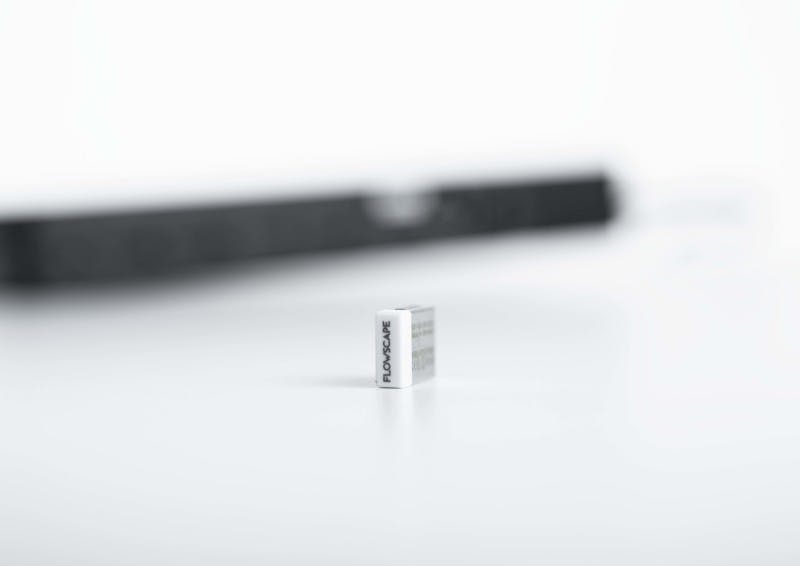
Monitor and release desks if no one shows up. Use our USB Presence sensor to activate Flowscape's automatic desk check-in function so desks are released after a no-show. An effective way to show the correct availability status of desks without unnecessary administrative work.
Automatic Desk Check-in requires the relevant USB Desk Sensor hardware. Validate sensor coverage, computer and software configuration, and no-show rules for your workplace.
Flowscape Automatic Desk Check-in uses the USB Desk Sensor to register when a user connects to the desk. Depending on the configured setup, this can support automatic check-in and the release of a reservation when a booked desk is not used. These capabilities are not software-only functions.


Easy Fault Reporting for Desks
You can use the fault reporting feature to instantly create support requests. The report is automatically routed to your chosen destination and a visual reminder will be displayed on the map to alert other users about the issue until it is resolved.

Drop-Down Desks
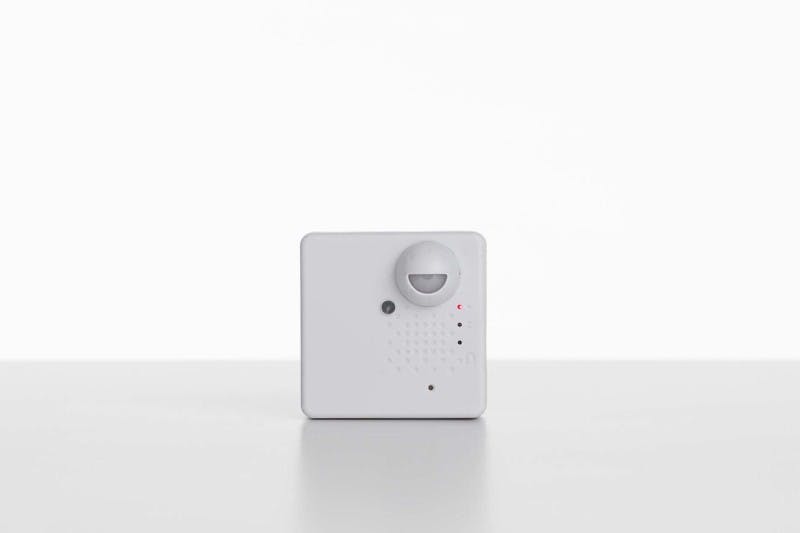
Want to have un-bookable desks? Our Presence sensors detect if someone is using a desk and shows it as red on the map. Our Busy lights can be set up to show if the desk is vacant or not from a distance.


Find Colleagues
Once a desk is booked, the user's name will be displayed on the Flowmap. Refer to the map, use the search function, or view colleagues' future bookings via the FlowPlanner.

Separate planned bookings from actual desk use
Bookings, check-ins and measured presence answer different questions. Choose evidence to match the decision: booking patterns for demand, check-ins for no-shows under the configured policy, and presence measurements for reviewing actual space use.
Bookings: planned demand
A booking records that someone intends to use a desk at a particular time. It helps teams understand planned demand, but a reservation can remain unused.
Check-ins: a recorded action
A check-in records a specific action, such as connecting a computer to the USB Desk Sensor. It can support no-show management under the configured policy, but does not prove continuous occupancy.
Presence: observed desk use
Presence measurements add observations about whether a desk was used during the measurement period. Interpret the results according to sensor coverage, configuration and the period observed.
Frequently Asked Questions
A Desk Management System facilitates organizations to embrace flexible and activity-based workspaces. With a Desk Management System, employees can easily reserve workspaces that align with their specific work-life requirements, ensuring a seamless and productive experience.

Key functionalities
FlowMap
Our 3D interactive maps will display all office resources and meeting spaces with clear color indications.
Automatic Check-in
Employees are automatically checked-in to their booked resource - and resources are automatically released after a no-show with our USB Desk sensor.
Flexible bookings
Book your desk from the desktop or mobile app. Use the search function by entering what features you need to locate a desk, or simply press on the desired desk on the map to book it. You can book a desk for the entire day, or for several hours.
Wayfinder
The built-in Wayfinder in the mobile app and Kiosk Screen shows the most optimal route to all office resources. Personal bookings can be easily accessed through "My Bookings" in the Flowscape app.
Fault Reporting
Employees can report issues directly to property managers, cleaning staff, or reception with the mobile app.
Colleague Finder
See your colleagues' desk bookings on the map and easily book nearby resources using Flowscape's built-in colleague finder or FlowPlanner.
Hardware for Desk management

Plan the setup around your workplace requirements
Define the decisions your desk-management setup needs to support across office areas and teams. Consider both the employee experience and the information Facility Management needs.
Review the requirements below during discovery. These questions form an evaluation checklist, not a fixed implementation process. The appropriate combination of software and optional hardware depends on the workplace, the information needed and the technical environment.
Your workplace requirements checklist
Desk inventory: Which desks, zones and equipment need to be represented?
Allocation model: Which places are shared, assigned or non-bookable?
Booking rules: Who needs to use each area, and how should availability be managed?
Employee planning: How should people find desks, equipment and colleagues?

Discuss desk management for your workplace
Talk to Flowscape about desk allocation, team zones, booking rules and the usage information you need. Start with the decisions you face and what employees need from the desk setup.
Our solution experts will design an optimum Space Management Solution that not only matches your current digital workplace requirements but also anticipates the future needs of your business. We provide relevant space data to give you a better picture of your space allocation.