
Hybrid work has changed how offices need to function. When employees split their time between home and the office, a traditional setup with one assigned desk per person creates a predictable problem: desks sit empty for large parts of the working week, while the company continues to pay for every square metre.
A desk booking system solves this directly. It gives employees a structured way to reserve a workspace before or when they arrive, and gives facility managers the data they need to understand how the office is actually used. This guide covers everything you need to know: what a desk booking system is, how it works, what to look for when choosing one, and how sensors and analytics make it more effective over time.
What is a Desk Booking System?
A desk booking system is software that allows employees to reserve a workspace in the office, either in advance or upon arrival. Instead of every employee having a permanently assigned desk, workspaces are shared and bookable. Employees claim the desk they need for the day, the system registers the booking, and other employees can see in real time which desks are free and which are occupied.
At its most basic, a desk booking system does three things. It lets employees find and reserve a desk. It shows the status of all desks in real time. And it collects data on how desks are used, which facility managers can use to optimize the office layout over time.
Modern desk booking systems go considerably further than this, offering colleague finding, wayfinding, integration with calendar tools, zone-based booking rules, automatic check-in, and occupancy analytics. These features are what separate a well-run flexible office from one that is merely trying to make do with fewer desks.
Key Terms: Understanding the Different Desk Types
Before looking at how desk booking systems work, it helps to understand the terminology. These terms are often used interchangeably in practice, but they describe meaningfully different setups.
Fixed seating is the traditional model where each employee has one permanently assigned desk. No booking is needed because each person always sits in the same place. This works well in smaller offices or for roles requiring specialist equipment, but it becomes inefficient in a hybrid environment where employees are not in the office every day.
Bookable desks are shared desks that employees can reserve in advance through a booking system. An employee claims a desk for a period of time, from an hour to several days, during which no one else can book it. This is sometimes referred to as desk hoteling, by analogy with booking a hotel room: you reserve in advance, check in when you arrive, and the space is yours for the duration of the booking.
Hot desks are shared desks that are taken on a first-come, first-served basis upon arrival. No advance booking is made. Hot desk are managed through presence sensors that show in real time which desks are occupied (shown in red) and which are free (shown in green).
Ad-hoc seating is similar to hot desking but with one distinction: ad-hoc desks can be booked at the moment the employee sits down, whereas pure hot desks are never formally booked at all. In practice, the difference is managed by sensors and the booking software.
Desk sharing is the broader term for any model where employees do not have permanently assigned desks. Bookable desks, hot desks, and ad-hoc seating are all forms of desk sharing.
Most offices that implement a desk booking system use a combination of these types. A portion of desks may be bookable in advance, others may operate as hot desks managed purely by sensors, and some fixed seats may remain for roles that require them. The booking system manages all of them from a single platform.
Why Organisations Use Desk Booking Systems
The primary driver is hybrid work. When employees work from home part of the week, offices designed for 100% daily attendance become significantly underutilised. A desk booking system makes it possible to right-size the office without sacrificing the employee experience.
Beyond cost efficiency, desk booking systems address several practical problems that emerge in a hybrid office.
Finding a desk on arrival. Without a booking system, employees who come to the office without knowing how busy it will be may struggle to find a suitable workspace, particularly if they have specific equipment requirements. A booking system solves this before they even leave home.
Finding colleagues. In a flexible seating environment, knowing where a colleague is sitting on a given day is not straightforward. A desk booking system with a Colleague Finder feature shows where each person has booked, making it easy to plan a day in the office with the right people nearby.
Planning team attendance. Teams that need to work together in person on specific days can use the booking system to coordinate their office days and book adjacent desks. Without this capability, the office may have the right number of people in it but the wrong people sitting next to each other.
Eliminating ghost bookings. Ghost bookings are desks that are reserved but never used. In a busy office, these are a real problem: other employees cannot book them because they appear occupied, but the person who booked never showed up. Desk booking systems with automatic check-in capabilities release these desks after a defined period, making them available to others.
Supporting facility management. Desk booking systems generate occupancy data that facility managers can use to understand actual usage patterns by building, floor, and zone. This data informs decisions about office layout, desk ratios, cleaning schedules, and future space requirements.
The Key Benefits of a Desk Booking System
Better use of office space. When desks are shared rather than assigned, the office can accommodate a hybrid workforce with fewer workstations. Space that would otherwise be occupied by empty assigned desks can be repurposed for collaboration areas, focus zones, or social spaces.
Reduced overhead costs. Fewer desks means a smaller office footprint is viable. Organisations that track actual occupancy through their booking system and analytics tools gain the data needed to make a well-evidenced case for right-sizing their real estate.
Improved employee experience. A well-implemented booking system removes the friction of arriving at the office and not knowing where to sit. Employees can book in advance, filter by equipment and location, check in without manual steps, and navigate directly to their desk via the app.
Cross-team collaboration. When employees are not permanently anchored to a departmental corner of the office, desk booking can actively support collaboration. Booking a desk near a colleague from another team becomes a deliberate, easy choice rather than an organisational event.
Data-driven decisions for facility managers. Occupancy analytics generated by the booking system reveal which desks and zones are consistently overused, which are underused, and where peak demand occurs. This makes planning more accurate and resource allocation more efficient.
Scalability. As headcount changes, a desk booking setup is far easier to adjust than a fixed-seating layout. Adding or reconfiguring zones, changing desk ratios, and updating booking rules can all be managed centrally through the admin portal.
How a Desk Booking System Works
The core workflow of a desk booking system is straightforward, but the details of implementation vary depending on the tools and hardware in place.
Booking
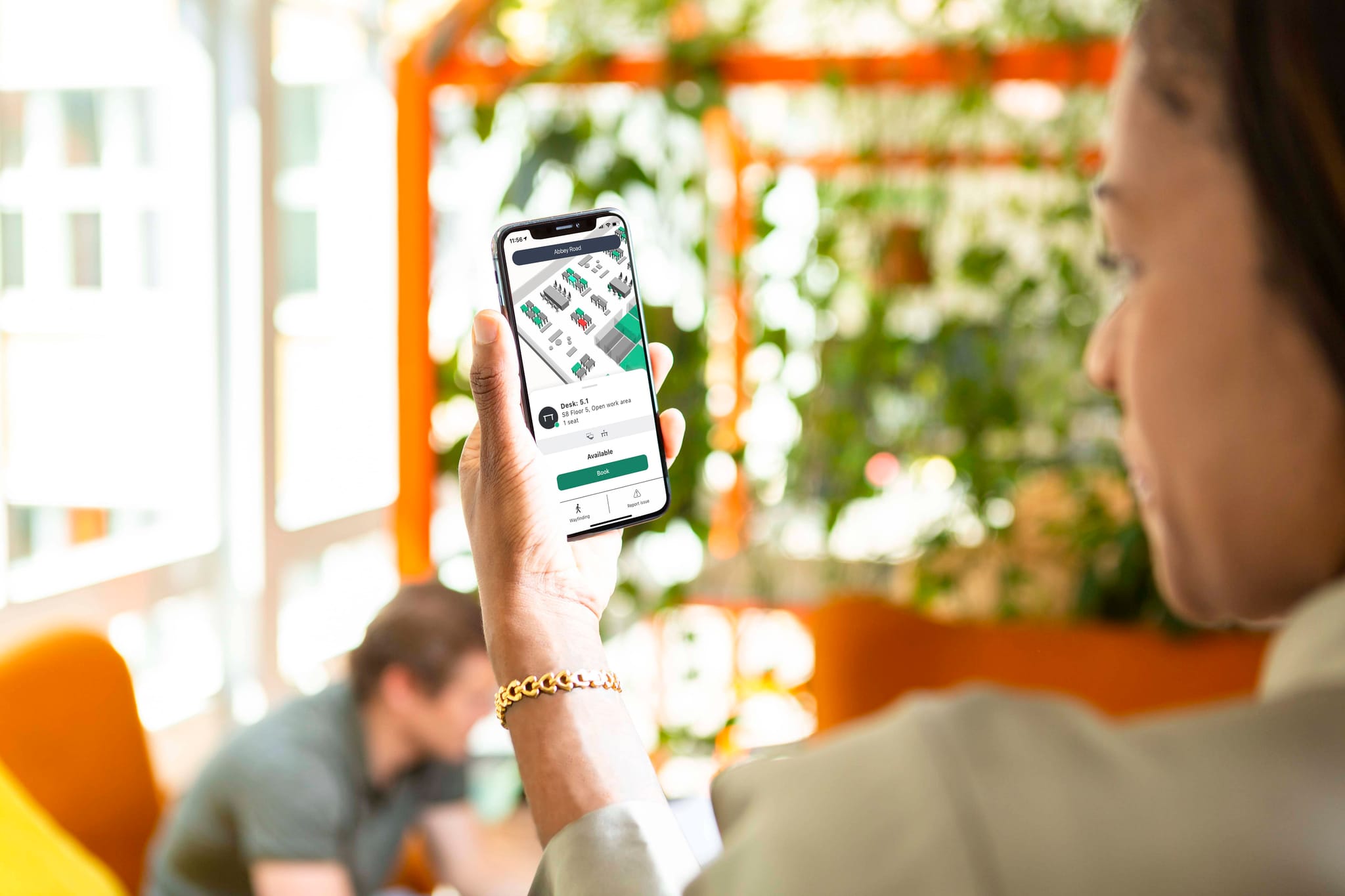
Employees open the app, web application, or Kiosk Screen at the office entrance. They can view a map of available desks, filter by equipment, zone, or location, and book a desk with a few clicks. Bookings can be made on arrival, earlier the same day, or days in advance depending on the booking policy.
Availability in real time
The system shows the status of every desk on an interactive map. Green desks are available. Red desks are booked or occupied. The map updates in real time as bookings are made and as presence sensors detect occupancy.
Check-in
When an employee arrives at their booked desk, they check in to confirm they have taken the seat. This can happen through the app, or automatically via a sensor when the employee connects their laptop. If no check-in occurs within a defined window after the booking start time, the desk is automatically released.
Wayfinding
Once a booking is confirmed, the app shows the most direct route to the booked desk within the building. This is particularly useful in large or multi-floor offices where navigation is not straightforward.
Colleague finding
The system shows the desk bookings of colleagues on the map. Employees can see where a specific person is sitting and book a nearby desk, or use the FlowPlanner to coordinate team office days in advance.
Fault reporting
If a desk has a problem (a broken monitor, a missing cable, a faulty chair) the employee can file a fault report directly from the app. The report is routed to the relevant team and a visual marker appears on the map to alert other users until the issue is resolved.
The Role of Sensors in Desk Booking
A desk booking system works better when it is connected to hardware that can report actual occupancy, not just bookings. Bookings tell you who planned to use a desk. Sensors tell you who actually used it. The combination of the two is what makes occupancy data genuinely accurate and useful.
Desk Presence Sensors are mounted at or under each desk. They use motion detection and temperature to sense when someone is seated, and automatically update the desk status on the map. They work for both bookable and hot desks, and can be the basis for automatic check-in: when someone sits at a booked desk, the sensor confirms the booking without any manual interaction.
Automatic Desk Check-in via USB sensor. Flowscape's Automatic Desk Check-in sensor plugs into a USB port in the monitor or docking station at each desk. When an employee connects their laptop, the system identifies them, confirms their booking, and registers their name on the FlowMap. If the employee connects at a desk they have not booked, the system prompts them to book it. If the desk was already booked by someone else, the employee is notified and directed to find another seat.
This sensor also eliminates ghost bookings automatically. If a booking exists but no laptop connection is detected within the grace period, the desk is released and becomes available to others. It also distinguishes between Perceived Occupancy (the time from connection to disconnection) and Real Occupancy (that time minus periods of inactivity), giving facility managers more precise utilisation data.
Desk Presence Sensors for drop-in desks. For hot desks and ad-hoc areas where no booking is made, Desk Presence Sensors provide the occupancy data that keeps the map accurate. They detect when someone sits down and show the desk as red on the map, without requiring any action from the employee.
Busy Lights are a physical complement to the digital map. A small LED mounted at or near each desk shows green when the desk is free and red when it is occupied or booked. They allow employees to assess desk availability across a floor at a glance, without consulting the app. This is particularly useful in large open-plan areas.
People Counter and Zone Sensors measure actual headcount in shared areas such as open collaboration zones, lounges, or cafeterias. This data helps facility managers understand whether common areas are sized correctly and how they are being used relative to desk areas.
How to Calculate Desk Utilisation
Desk utilisation is the measure of how often desks are actually used relative to how often they could be used. Understanding this metric is essential for making informed decisions about desk ratios, office layout, and real estate.
The simplest version of the calculation is:
Desk utilisation rate = number of desk-hours used / number of desk-hours available
For example, if an office has 100 desks and is open for eight hours a day, the maximum available desk-hours in a week is 4,000. If actual usage, measured by sensors, amounts to 2,400 desk-hours in that week, the utilisation rate is 60%.
In practice, there are two ways to measure usage:
Perceived Occupancy is the total time a desk is booked or shown as occupied, from when someone connects their laptop (or is detected by a presence sensor) to when they leave. This is the easier metric to gather and provides a reasonable picture of usage.
Real Occupancy refines this by subtracting periods of inactivity. A desk may show as occupied because a laptop is docked, but if the employee is in meetings for three hours with no keyboard or mouse activity, those hours are not genuinely productive desk usage. Flowscape's Automatic Desk Check-in sensor measures both metrics, allowing facility managers to compare them and understand the gap between booked time and actual use.
Knowing your utilisation rate by zone, floor, and building is what makes decisions about right-sizing the office credible and defensible. Rather than estimating how many desks are needed, facility managers can show exactly what the data says.
What to Look for When Choosing a Desk Booking System
Not all desk booking systems are built for the same type of office. These are the key capabilities worth evaluating.
Ease of use for employees
A desk booking system only works if employees actually use it. The booking flow should be simple enough to complete in a few seconds on a mobile device. If employees find it easier to just turn up and hope for a desk, the system will not deliver its intended benefits.
Real-time availability
The system must show which desks are available right now, not just which are booked. This requires sensor integration to pick up ad-hoc usage and confirm actual occupancy, not just calendar entries.
Filtering by equipment and zone
Different roles need different setups. A developer who needs dual screens should be able to filter for desks with that equipment. An employee who needs a quiet environment should be able to select a focus zone. The booking system should support this level of specificity.
Automatic check-in and ghost booking prevention
Without automatic check-in, ghost bookings accumulate quickly in any busy office. Look for a system that integrates with sensors to confirm bookings without requiring employees to remember a manual step.
Zone-based booking rules
The ability to configure different rules for different parts of the office gives facility managers and HR teams the flexibility to reserve certain zones for specific teams, set lead-time limits for advance bookings, or restrict certain desks to specific roles.
Calendar integration
If employees already use Microsoft 365 or Google Workspace, a desk booking system that integrates with those calendars reduces friction significantly. Desk bookings can appear alongside meeting bookings, and employees can coordinate their office days directly from tools they already use.
Analytics and reporting
The system should provide utilisation data by desk, zone, floor, and building. Trend analysis over time, comparison of booked versus actually occupied time, and the ability to export data for further analysis are all capabilities that become important as the organisation matures in its use of the tool.
Scalability and multi-site support
For organisations with multiple offices, the ability to manage all locations from a single admin portal, with centralised reporting across sites, is essential.
Integrating a Desk Booking System with Your Existing Tools
A desk booking system should fit into the tools your employees already use, not sit alongside them as a separate system they need to remember to check.
Integration with Outlook and Teams allows desk bookings to appear in the calendar, sends reminders via Teams notifications, and enables employees to see colleague office schedules directly from their calendar. For organisations that have standardised on Microsoft 365, this integration removes the main barrier to adoption.
For Google users, the equivalent integration connects the desk booking system with Google Calendar, enabling the same coordination and visibility that Microsoft users get via Outlook.
Support for OpenID, Okta, and other Single sign-on (SSO) providers means employees can log in with their existing company credentials. This removes the need for separate account management and makes IT deployment straightforward.
For offices where certain areas require authorised entry, the desk booking system can integrate with existing access control infrastructure to grant or restrict entry based on bookings.
How Flowscape's Desk Booking System Works in Practice
Flowscape's Desk Management solution covers the full desk booking workflow, from initial search to occupancy analytics, in a single platform.
Employees access the system through the Flowscape mobile app, web application, or a Kiosk Screen at the office entrance. The FlowMap shows a 3D real-time view of the entire office, with desks colour-coded by availability: green for free, red for booked or occupied. Employees can search by equipment, zone, or location, or use the Desk Booking wizard to find the most suitable available desk based on their stated criteria.
Bookings can be made for the whole day or by the hour. The Colleague Finder shows where team members have booked, making it easy to plan a day in the office with the right people nearby. FlowPlanner allows teams to coordinate which days they will be in the office in advance, with everyone's plans visible to the group.
Check-in happens automatically when an employee connects their laptop via the Automatic Desk Check-in USB sensor. If no check-in is detected within the configured grace period, the desk is released. Desk Presence Sensors handle hot desks and drop-in areas where no booking is made. Busy Lights at each desk show availability physically, visible from across the floor.
FlowAnalytics consolidates the booking and sensor data into utilisation reports by building, floor, and zone. Facility managers can track peak hours, identify underused areas, compare perceived and real occupancy, and simulate future space requirements using actual usage data. Reports are exportable in PDF and CSV formats.
The entire solution can be deployed in days. Sensors are wireless and battery-powered. The admin portal manages configuration, booking rules, and zone settings centrally, without requiring on-site IT presence for changes.
Request a demo to see how it works in your office.
FAQ: Desk Booking Systems
What is a desk booking system?
A desk booking system is software that allows employees to reserve a workspace in the office, either in advance or on arrival. Desks are shared across the team rather than permanently assigned, and the system shows which desks are available in real time. It is used in hybrid offices to manage flexible seating and provide facility managers with occupancy data.
What is the difference between a desk booking system and a desk management system?
A desk booking system focuses specifically on the process of reserving and managing individual desks. A desk management system is a broader term for the complete platform, including booking software, sensors, analytics, and hardware, that manages all workspace types in the office: fixed seats, bookable desks, hot desks, and drop-in areas.
How do sensors work with a desk booking system?
Sensors detect actual occupancy at each desk and update the booking system's map in real time. Desk Presence Sensors use motion and temperature to detect when someone is seated. The Automatic Desk Check-in USB sensor detects when a laptop is connected to a docking station and registers the booking automatically. Together, they keep the map accurate and eliminate ghost bookings without requiring manual check-in from employees.
What is a ghost booking?
A ghost booking is a desk reservation where the employee did not show up, but the desk was never released. Other employees cannot book the desk because it appears occupied. Ghost bookings are prevented by automatic check-in systems that release desks after a configurable grace period if no actual occupancy is detected.
What integrations should a desk booking system support?
At a minimum, a desk booking system should integrate with Microsoft 365 (Outlook and Teams) and Google Workspace for calendar coordination. Single sign-on support via OpenID or Okta simplifies IT deployment. Sensor integration is essential for real-time availability and automatic check-in.
How many desks does an organisation need for a desk booking setup?
This depends on actual office attendance, which is best measured before making any changes. Occupancy sensors and analytics tools can provide this data by day, floor, and zone. A desk booking system with good analytics makes it straightforward to base this decision on evidence rather than estimation.
Can a desk booking system work alongside fixed seating?
Yes. Most organisations implement a mixed model: some desks remain fixed for roles that require it, while others become bookable or hot desks. A desk booking system like Flowscape's manages all desk types within the same platform, with different booking rules applied per zone.
What is desk utilisation and how is it measured?
Desk utilisation is the proportion of available desk-hours that are actually used. It is measured by comparing booking data against sensor data. Perceived Occupancy captures the total time a desk is booked or shown as occupied. Real Occupancy refines this by subtracting inactivity periods, giving a more accurate picture of genuine usage. Flowscape's Automatic Desk Check-in sensor measures both.
Read More
- Desk Management Solution
- Workplace Analytics: FlowAnalytics
- The Complete Guide to Hot Desking
- The FlowMap
- Automatic Desk Check-in
- Desk Presence Sensor
- Sensors for the Hybrid Office
- Room Booking System
Flowscape Solutions helps organisations build smarter hybrid offices. Our Desk Management platform combines booking software, occupancy sensors, real-time maps, and workplace analytics in one solution designed for the modern office. Get in touch to see how it fits your workplace.